Managing Multiple Social Networks
#socialmedia #webapps
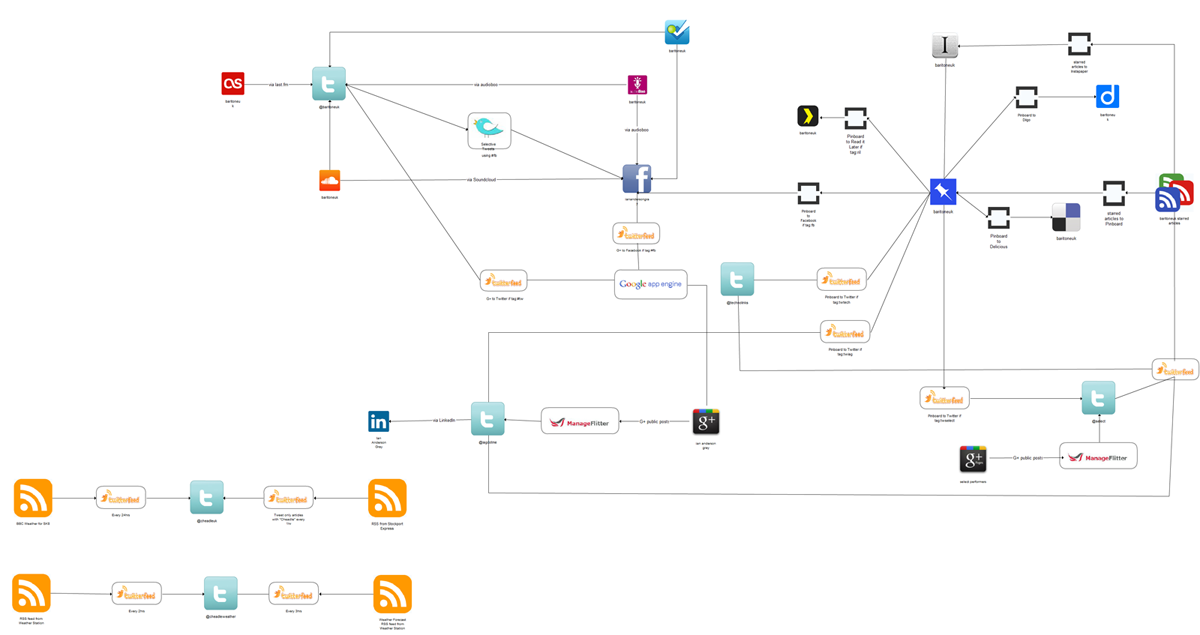
With so many social media platforms out there it is becoming more and more difficult to manage them, and this is particularly complex when you are managing them on behalf of clients. I’ve been looking for a way to visualise how all my multiple social networks connect using the various tools I use and I came across creately.com which does exactly what I needed. It allows me to connect visually all my social networks and describe the process involved. Have a look at the photo included in this post and hopefully it’ll give you an idea. It’s not very high resolution, but you can see how all the various networks connect.
I tend to share cool articles I find using Google Reader. If I see a great article, I will star it. Then ifttt updates Pinboard, Delicious, Instapaper, Read it Later and Diigo with these articles. If I see an article that I think will be helpful to some of my followers I can tag that on Pinboard. I can choose which social network to share that with depending on the tags that I use. I use a combination of ifttt and Twitterfeed for this. For example:
tw will send article to my personal Twitter account
twselect will send to our company Twitter account
twiag will send to my seo & social networking Twitter account
fb will send to my Facebook account
ril will add to Read it Later & Instapaper
I use manageflitter to post my G+ articles to one of my Twitter accounts and the same to post from our G+ business page to our company Twitter account. I share some Twitter posts to my personal FB account using Selective Tweets. Then there are various other Twitter accounts where we use TwitterFeed to update and of course there is Last FM, Foursquare, Soundcloud, Youtube and a plethora of others that I haven’t mentioned.
Quite a few of the tools I’ve included here were mentioned in a great post by Johnathan Chung – https://plus.google.com/114424163811716070551/posts/9yE2eo4Ebu3
I know that there are many other tools out there from the likes of Jesse Stay and there is of course HootSuite
The diagram is very much work in progress! I haven’t included (yet) my Facebook business pages or how I get my Google starred articles to be sent to my Kindle each day.
How do you manage all your networks? I’d be interested in what the likes of FreshNetworks , Mark Traphagen and Francisco Rosales use I’d be very interested to know!
Links:
Instapaper
A simple tool to save web pages for reading later.
Pinboard
Pinboard is a fast, no-nonsense bookmarking site.
ifttt
_Put the internet to work for you by creating tasks that fit this simple structure:
if this then that_
Twitter Feed
Feed your blog to Twitter and Facebook
Selective Tweets
Share only the Tweets you want to your FB profile using the hashtag #fb
https://www.facebook.com/selectivetwitter
You may wonder why I use Pinboard, Delicious and Diigo. The truth is I only really use Pinboard, but I use Delcious and Diigo for backup purposes and because I don’t want to loose my Delicious followers.
Too much automation
Forgot to add this when I originally wrote this post)
The diagram shows how I automate my current social networks. However, none of this should get in the way of the fact that they’re called social networks for a reason. It’s vital that we engage with people on our social networks. I concentrate on doing that on 3 Twitter accounts, Facebook and Google+. This is hard work (especially as it tends to me only me that updates them!) but it’s also fun too.
